Introduction
TL;DR: Hosted Kafka services run and scale Kafka clusters for you, so small teams don’t need to manage brokers. NetApp Instaclustr is best for teams wanting strong SLAs and BYOC control, Confluent Cloud fits full-platform needs, Aiven works for predictable plan-based pricing, and DigitalOcean Managed Kafka is the flat-rate option for early-stage workloads.
Editor’s note: Updated the article to cover recent market trends, updated product information to reflect features and capabilities in 2026, and added X new tool/s.
What Are Managed Apache Kafka tools?
The most cost-effective hosted Apache Kafka options for startups prioritize serverless billing, scale-to-zero capabilities, or object-storage architectures that minimize expensive local disk provisioning.
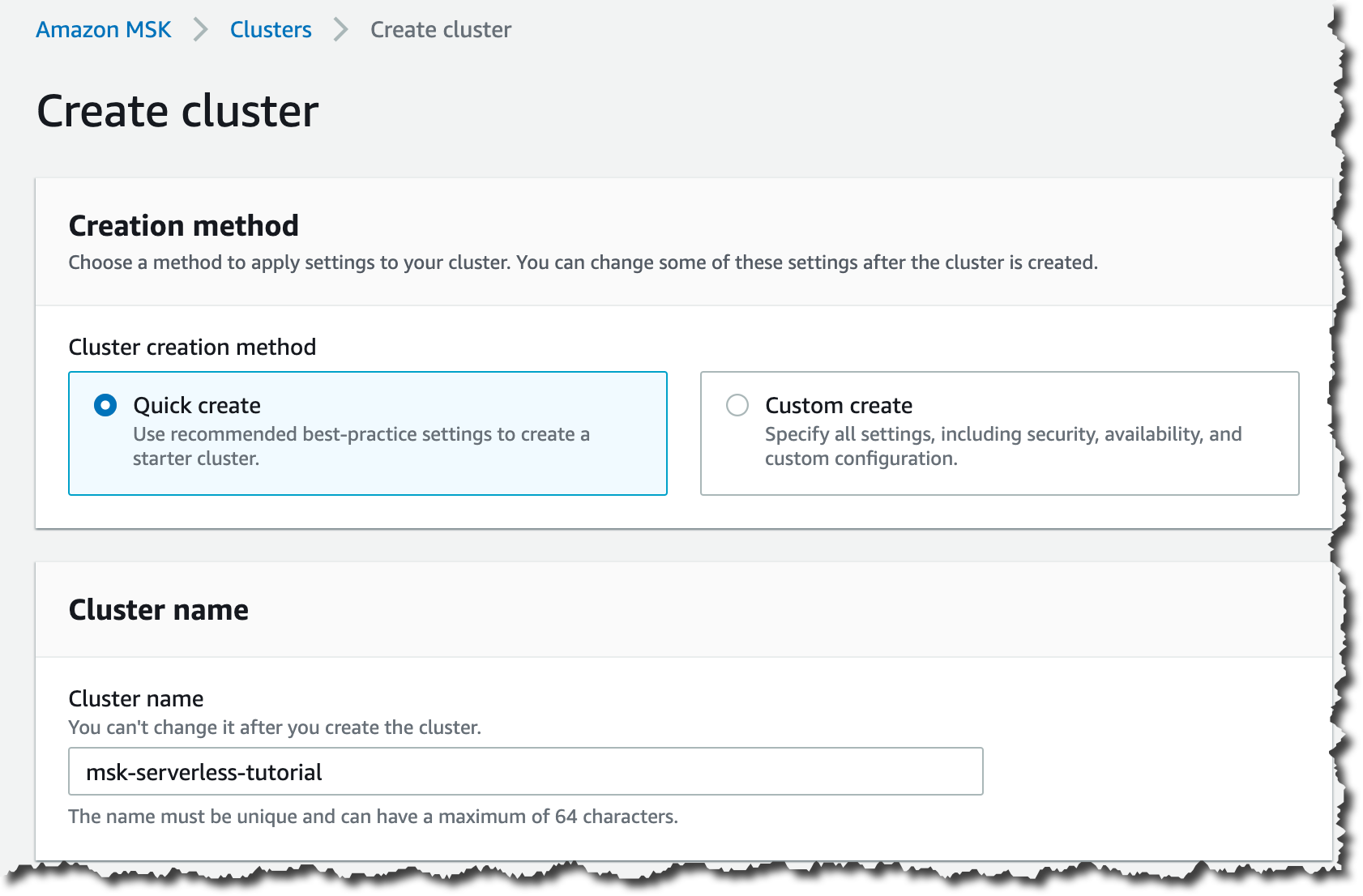
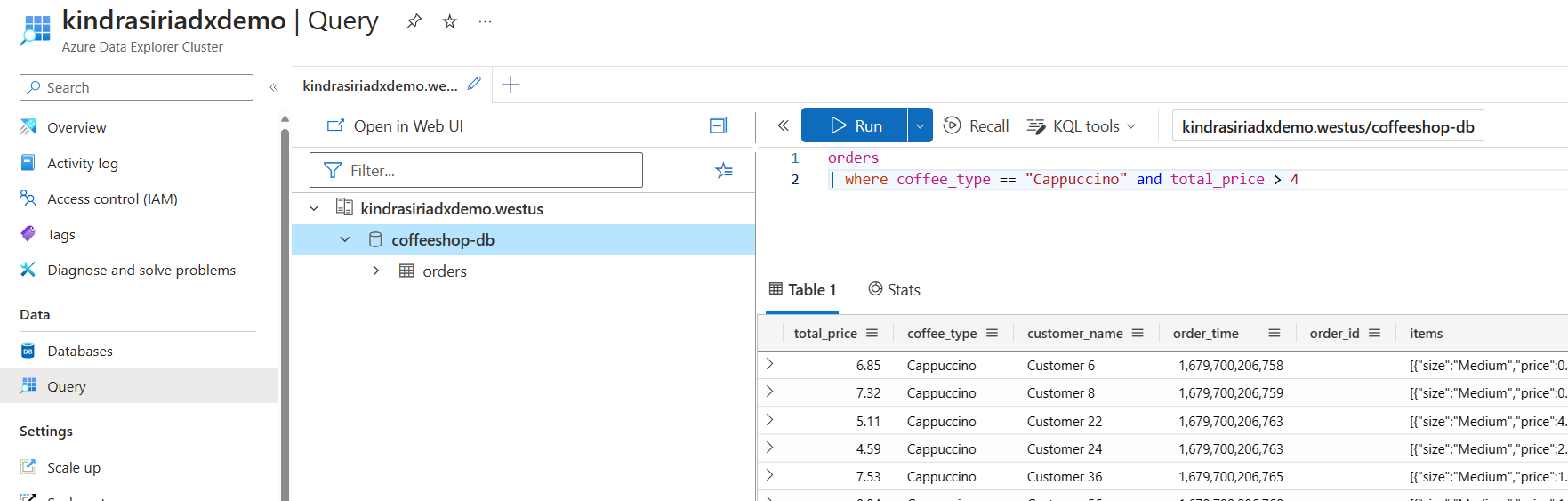
Apache Kafka is a distributed event streaming platform used for real-time data processing. These tools are offered as managed services by cloud or dedicated providers, taking over operational tasks. Managed Kafka tools also cover the interfaces used to operate clusters day to day, from command-line utilities to desktop GUIs and web-based management platforms.
They are especially useful for eliminating setup complexities, managing infrastructure, and freeing developers to focus on building applications rather than managing Kafka clusters manually. The managed Kafka landscape has also shifted with the platform’s own evolution: recent architectures move storage to low-cost object storage and retire long-standing dependencies, changing the cost and operational profile of running Kafka at scale.
Why hosted Kafka makes sense for startups:
- Lower operational overhead: Managed providers handle provisioning, maintenance, upgrades, replication, and monitoring so teams spend less time operating Kafka.
- Faster time to production: Hosted Kafka offers ready-to-use clusters with built-in tools, helping teams launch event streaming faster.
- Easier scaling as traffic grows: Managed services simplify adding capacity as event volume, retention needs, and consumer workloads increase.
- Reduced need for specialized Kafka expertise: Providers manage much of the infrastructure, reducing the operational Kafka knowledge startups need in-house.
This is part of a series of articles about Apache Kafka
Editor’s note: Updated the article to cover recent market trends, updated information for managed Kafka tools to reflect features and capabilities in 2026. This revision adds the shift to Apache Kafka 4.0 and KRaft, serverless and diskless storage trends, refreshed and expanded service listings with comparisons, and a guide to Kafka management tooling, as of 2026.
Hosted Kafka Tools at a Glance
The table below summarizes the main differences between the services covered in this guide, including who each one suits and where the trade-offs sit. We explore each service in more detail in the sections that follow.
| Category | Solution | Best For | Key Strengths | Things to Consider |
|---|---|---|---|---|
| Data streaming vendors | NetApp Instaclustr for Apache Kafka | Fully managed open source Kafka with high SLAs | Up to 99.999% SLA, BYOC or hosted, 24×7 Kafka support | No free sandbox tier |
| Data streaming vendors | Confluent Cloud | Teams needing a platform beyond core Kafka | Serverless autoscaling, 120+ connectors, managed Flink | Cost climbs with volume; features gated to higher tiers |
| Data streaming vendors | WarpStream | Startups needing Kafka-compatible streaming with usage-based pricing | Diskless BYOC architecture, no inter-AZ fees, volume-tiered unit pricing | Runs in your own cloud account; younger product with thinner review coverage |
| Data streaming vendors | Redpanda Cloud | Kafka-compatible streaming with zero base cost | Serverless with no base cost, tiered storage, 300+ connectors | Cloud pricing not published; wide community/enterprise gap |
| Cloud platform providers | Amazon MSK | AWS-centric teams running Kafka beside AWS services | Express brokers, serverless option, native AWS integration | Dedicated brokers cost a lot at low volume |
| Cloud platform providers | Google Cloud Managed Service for Apache Kafka | Google Cloud teams streaming into BigQuery | Cluster-level sizing, automatic broker sizing, tiered storage | Three-zone clusters only; no zone or local storage choice |
| Cloud platform providers | Azure Event Hubs | Azure teams ingesting events via a Kafka endpoint | Throughput-unit pricing, Kafka endpoint, Capture to storage | Kafka excluded from Basic tier; short retention windows |
| Cloud platform providers | DigitalOcean Managed Kafka | Small teams wanting flat-rate managed Kafka | Flat monthly cluster price, schema registry, storage autoscaling | Fewer advanced features; pricing steps up sharply |
Why Hosted Kafka Makes Sense for Startups
Lower Operational Overhead
Managed Kafka providers handle cluster provisioning, broker maintenance, software upgrades, replication, and infrastructure monitoring. This removes much of the routine work required to keep Kafka available and healthy.
For startups with small engineering teams, this can reduce time spent on infrastructure operations. Developers can focus on producers, consumers, data pipelines, and application logic instead of managing brokers and storage.
Faster Time to Production
Hosted Kafka services provide ready-to-use clusters without requiring teams to design and deploy the underlying infrastructure. Many also include built-in authentication, monitoring, schema management, connectors, and configuration tools.
This shortens the path from development to production. Teams can create a cluster, configure access, and start publishing events without first building a complete Kafka operations stack.
Easier Scaling as Traffic Grows
Kafka capacity requirements can change quickly as event volume, retention periods, and consumer workloads increase. Managed services simplify scaling by automating or reducing the work involved in adding compute, storage, and throughput capacity.
Some hosted platforms also separate compute from storage or use object storage for retained data. These architectures can reduce the need to provision brokers around peak storage requirements and make capacity changes less disruptive.
Reduced Need for Specialized Kafka Expertise
Operating Kafka directly requires knowledge of partitioning, replication, broker sizing, storage, networking, upgrades, failure recovery, and performance tuning. Building this expertise internally can be difficult for an early-stage company.
Managed Kafka shifts many infrastructure responsibilities to the provider. Application teams still need to understand topics, partitions, consumer groups, delivery semantics, and data design, but they need less expertise in operating the underlying cluster.
What Makes a Hosted Kafka Tool Cost-Effective?
A cost-effective hosted Kafka service minimizes both infrastructure spending and operational work. Pricing models matter: serverless and usage-based services can be economical for startups because costs track actual throughput rather than continuously provisioned broker capacity. Scale-to-zero support can reduce costs further for development environments and intermittent workloads.
Storage architecture is another important factor. Services that move retained data to object storage can avoid the cost of keeping large datasets on broker-attached disks. Separating compute and storage can also let teams scale processing capacity independently instead of adding brokers simply to gain storage.
The total cost should include more than the advertised price per GB or cluster. Network transfer, storage, partitions, connectors, schema management, observability, support, and minimum capacity charges can materially affect the bill. Operational costs also matter because automated upgrades, scaling, recovery, and monitoring reduce the engineering time required to maintain Kafka.
Cost-effectiveness therefore depends on workload characteristics. Startups should compare providers using expected throughput, retention, traffic patterns, and growth rather than headline pricing alone.
Hidden Costs to Consider When Choosing Managed Kafka
Network Egress
Managed Kafka pricing often excludes or separates data transfer charges. Moving events from the Kafka service to applications in another cloud, region, or network can generate egress fees that grow quickly with high-throughput workloads.
Keeping producers and consumers close to the Kafka cluster can reduce these charges. Startups should estimate outbound traffic separately from Kafka throughput pricing, especially when services run across multiple cloud providers.
Cross-Region Traffic
Replication and consumption across regions can create additional network costs. These charges may apply when mirroring topics for disaster recovery, serving geographically distributed applications, or maintaining active-active deployments.
Cross-region architectures can improve resilience, but they can also multiply transfer costs because the same events may be copied several times. Teams should include replication volume in their cost models rather than considering only client traffic.
Storage and Long Retention Periods
Kafka costs increase when large volumes of data are retained for days or weeks. Providers may charge separately for broker storage, object storage, or data retained beyond an included allowance.
Long retention can be particularly expensive on services that depend heavily on local disks. Platforms that tier older segments to object storage may reduce this cost, but retrieval and transfer charges can still apply.
Schema Registry and Connectors
Schema registries, managed connectors, and integration services are not always included in the base Kafka price. Providers may charge per schema, connector task, compute unit, or connector instance.
These costs can become significant when a deployment relies on many database, storage, and SaaS integrations. Teams should also check whether connectors require dedicated workers that run continuously even when traffic is low.
Monitoring and Observability
Metrics, logs, tracing, and alerting may generate separate charges inside the Kafka service or through an external observability platform. High-cardinality metrics and detailed broker or client logs can increase ingestion and retention costs.
Exporting telemetry to another service can also introduce network charges. Startups should decide which metrics and logs are operationally necessary instead of retaining all available telemetry by default.
Dedicated Clusters
Dedicated clusters provide stronger isolation and more predictable performance, but they usually introduce minimum capacity commitments. This means teams may pay for provisioned brokers or compute even when workloads are small or idle.
For early-stage workloads, shared or serverless options can be more economical. Dedicated clusters tend to make more sense when sustained throughput, compliance requirements, or workload isolation justify the fixed cost.
Support Plans
Enterprise support is often priced separately from the Kafka service itself. Higher support tiers may include faster response times, architecture guidance, incident assistance, and dedicated account or technical contacts.
These plans can materially increase total spending, especially when priced as a percentage of monthly usage or with a minimum fee. Startups should compare the support level included by default with the level they realistically need.
Managed Apache Kafka market trends
The managed Apache Kafka market is experiencing rapid growth, driven by the increasing demand for real-time data processing and cloud-native architectures. The managed Kafka services market is projected to grow from about $5.7 billion to $13.67 billion by 2033 at a CAGR of around 27.6%, highlighting widespread enterprise adoption.
As organizations generate massive volumes of streaming data from applications, IoT devices, and digital platforms, the need for scalable and low-latency data pipelines has become critical. One of the most notable trends is the strong shift toward Kafka-as-a-Service (KaaS) offerings. Enterprises are increasingly moving away from self-managed clusters due to the operational complexity and high expertise required, opting instead for managed solutions that provide automated scaling, monitoring, and security.
Several key trends are shaping this market:
- Cloud-native and hybrid deployments: Organizations increasingly adopt managed Kafka across multi-cloud and hybrid environments for flexibility and compliance.
- Integration with modern architectures: Kafka is becoming central to microservices, event-driven systems, and real-time analytics platforms.
- Support for AI and real-time analytics: Streaming data is critical for powering predictive analytics and AI/GenAI applications, further boosting Kafka adoption.
- Ecosystem expansion: Growth in connectors, APIs, and complementary tools (like stream processing frameworks) is increasing Kafka’s versatility.
- Enterprise focus on reliability and governance: Managed services emphasize security, compliance, and 24/7 availability, aligning with enterprise requirements.
- Serverless and diskless architectures: Providers increasingly offer tiered and object-storage-backed diskless options that decouple storage from compute to cut cost, an approach formalized in the Apache Kafka community in 2026.
Sources:
Apache Kafka 4.0 and the shift to KRaft
Apache Kafka 4.0 is the first major release to run entirely without Apache ZooKeeper, using KRaft (Kafka Raft) for metadata management by default. Removing the separate ZooKeeper ensemble simplifies deployment, lowers operational overhead, and improves scalability and controller failover. For managed Kafka users the change is largely invisible, since providers run KRaft-based clusters and handle the transition, but it reshapes what a modern managed platform looks like underneath.
The 4.x line also introduces a next-generation consumer group protocol that speeds up rebalances and reduces downtime in large deployments, along with early support for queue-style consumption for point-to-point messaging patterns. Managed providers increasingly offer automated ZooKeeper-to-KRaft migration so existing clusters can move across with minimal disruption.
Notable Kafka Cost-Effective Hosted Kafka Tools for Startup
How we selected these tools: We shortlisted hosted Kafka services based on pricing model transparency, storage and compute architecture, scaling behavior, connector and schema management support, security and compliance controls, and how much cluster operations work they remove from a small engineering team.
Managed Kafka Services from Data Streaming Vendors
1. NetApp Instaclustr for Apache Kafka

Best for: Fully managed open source Kafka with high availability SLAs
Strengths: Up to 99.999% SLA, BYOC or hosted, 24×7 Kafka support
Things to consider: Documentation and console gaps; no free sandbox tier
NetApp Instaclustr runs production Apache Kafka clusters in the cloud, on-premises, or in hybrid setups, currently on Kafka 4.0. Clusters can be provisioned through a console, an API, or a Terraform provider, and the platform handles upgrades, patching, redundancy, and automatic failover.
Deployment works either as Bring Your Own Cloud, where clusters run in the customer’s own cloud account, or as fully provisioned hosting. A dedicated technical operations team monitors clusters around the clock and is alerted when investigation is needed. Compliance coverage includes SOC 2, ISO 27001, ISO 27018, PCI-DSS, and HIPAA.
Pricing:
- Pricing is quote-based rather than published as fixed self-service rates.
- Costs depend on deployment model, infrastructure size, cloud provider, storage, support level, and optional services.
- BYOC can be more cost-effective for teams that want to use their own cloud discounts and keep infrastructure spend in their existing account.
- The managed model can reduce operational costs by offloading upgrades, monitoring, failover, and Kafka administration to the provider.
- Diskless Kafka can lower storage costs for retention-heavy workloads by separating compute from object storage.
Key features include:
- Console, API, and Terraform provisioning: Production-ready clusters can be created in minutes without deep Kafka configuration knowledge, using a web console, the API, or the Terraform provider.
- Availability and latency SLAs: Enterprise deployments with dedicated ZooKeeper or KRaft nodes carry a 99.999% availability SLA, standard deployments carry 99.99%, and latency SLAs go up to 99%.
- Dedicated or co-located coordination nodes: ZooKeeper and KRaft nodes can be run either dedicated or co-located with brokers, changing the performance and availability profile of the cluster.
- Managed mirroring with MirrorMaker 2: Mirrors data between geographic regions, supports active/active topologies, and maintains failover copies, with the operations team taking end-to-end responsibility for the mirroring service.
- Kafka Connect as an add-on: Kafka Connect can be added from the console to run low-code connectors between Kafka and other products in the data layer.
- Horizontal and vertical scaling: Nodes can be added or removed to scale capacity in either direction, with zero downtime migration, and clusters can also be scaled down.
- Built-in monitoring and automated health checks: Cluster health is monitored continuously, with the 24×7 Kafka team alerted when action or investigation is required.
- Kafka Diskless architecture: Separates storage from compute for selected workloads, changing the infrastructure profile of long-retention topics.
- MCP Gateway: Provides AI applications and agents with governed, standardized access to Kafka data infrastructure.
Limitations (as reported by users on G2):
- Third-party monitoring integration: Reviewers reported friction connecting an external monitoring tool to their clusters.
- Documentation alignment: Documentation for Kafka and for Instaclustr does not always line up, and not every Kafka capability is exposed out of the box.
- No free test environment: Reviewers asked for a free sandbox tier in the pricing model for trying the platform before committing.
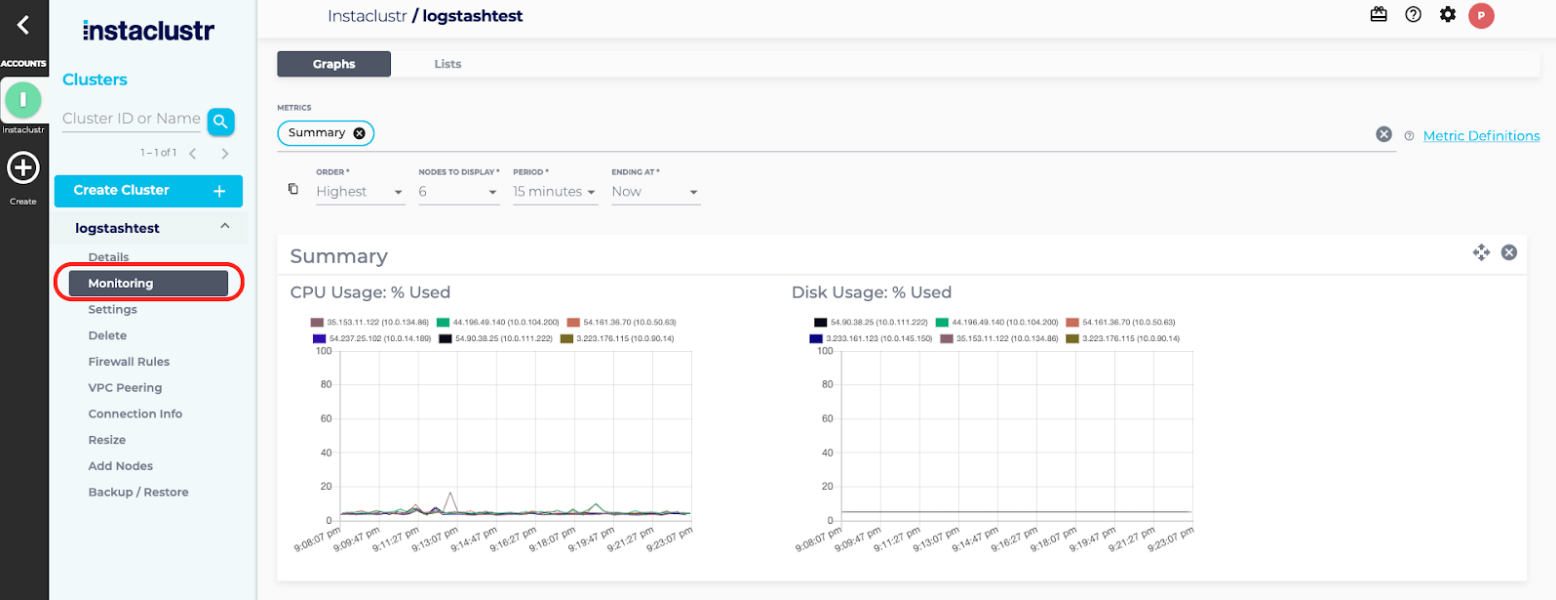
Source: NetApp Instaclustr
2. Confluent Cloud

Best for: Teams needing a full streaming platform beyond core Kafka
Strengths: Serverless autoscaling clusters, 120+ connectors, managed Flink
Things to consider: Costs climb with volume; features gated to higher tiers
Confluent Cloud, now part of IBM, is the fully managed deployment of Confluent’s data streaming platform, built on Kora, its cloud-native Kafka engine. Clusters autoscale rather than being pre-provisioned, and the service runs across AWS, Microsoft Azure, and Google Cloud in more than 100 regions.
The platform layers stream processing, governance, connectors, and table materialization on top of Kafka. Cluster types can be mixed within an organization, so a low-volume test workload and a high-volume logging pipeline can sit on different tiers. Cluster Linking connects clusters across regions, clouds, and organizations.
Pricing:
- Basic clusters start at $0/month.
- The first eCKU is free; additional usage starts at about $0.14 per eCKU-hour.
- Data transfer starts at about $0.05/GB.
- Storage starts at about $0.08/GB-month.
- Standard starts at about $0.75 per eCKU-hour.
- Enterprise starts at about 1.75–2.25 per eCKU-hour.
- Freight starts at about $2.25 per eCKU-hour, with a two-eCKU minimum.
- Connectors, Flink, and Stream Governance are billed separately.
- New users receive $400 in credits for 30 days.
- Annual commitments and higher usage can reduce unit costs.
Key features include:
- Serverless autoscaling with eCKUs: Elastic Confluent Units for Kafka scale up and back down with demand without user intervention, so capacity is not pre-provisioned.
- Four cluster tiers: Basic, Standard, Enterprise, and Freight differ on throughput ceilings, partition limits, storage limits, uptime SLA, and networking, from 250 MBps ingress on Basic up to 9,120 MBps on Freight.
- Cluster Linking: Replicates, syncs, and shares data directly between clusters in different regions, public clouds, or organizations, over public or private networks.
- Managed connectors: More than 120 pre-built and 80 to 90 fully managed Kafka connectors are available for databases, data lakes, and data warehouses.
- Flink and Stream Governance: Confluent Cloud for Apache Flink handles stream processing, while Stream Governance covers lineage, schema management, and data quality rules.
- Tableflow: Materializes Kafka topics and schemas as Apache Iceberg or Delta Lake tables for downstream lakes and warehouses.
- Security and compliance controls: RBAC, encryption at rest and in transit, client-side field-level encryption, customer-managed keys, audit logs, private networking, and FedRAMP Moderate authorization.
- Operational tooling: A Metrics API, Terraform and Pulumi support, OpenTelemetry observability, a CLI, and Kafka Copy Paste, an open source migration tool.
Limitations (as reported by users on G2):
- Cost growth with data volume: Reviewers report that spend rises quickly as throughput increases, and describe the platform as potentially prohibitive for smaller businesses and startups.
- Feature availability by tier: Several capabilities reviewers wanted are restricted to higher editions, and some authentication methods require a separately purchased product.
- Console debugging depth: Message browsing, event tracing, and search within topics are described as underpowered, pushing users to CLI tools or custom consumers.
- Learning curve and documentation: Reviewers cite a steep learning curve across Kafka, connectors, and security, with deployment documentation described as outdated or not beginner-friendly.
- Billing transparency: Some reviewers found it hard to work out exactly how usage translates into charges, making internal reporting difficult.
- Managed connector configuration: Certain connector settings are not exposed or carry limits that cannot be overridden.
3. Warpstream
Best for: Startups needing Kafka-compatible streaming with usage-based, no-base-cost pricing
Strengths: Diskless BYOC architecture, no inter-AZ fees, volume-tiered unit pricing
Things to consider: Runs in your own cloud account rather than as a fully hosted SaaS; younger product with thinner review coverage
WarpStream is a Kafka API-compatible streaming platform that eliminates local broker disks entirely, writing data directly to object storage such as S3, GCS, or Azure Blob Storage. It runs as Bring Your Own Cloud, meaning stateless Agents deploy inside the customer’s own cloud account and compute, so data never leaves the customer’s environment while WarpStream operates only the control plane.
WarpStream was acquired by Confluent in 2024, and Confluent itself became an IBM company in March 2026, but WarpStream continues to operate as its own product with a separate console, pricing, and roadmap. Because Agents are stateless, there is no partition rebalancing, broker capacity planning, or KRaft controller management to worry about, and scaling out only requires adding containers.
Pricing:
- No per-Agent or per-core platform fee.
- Write throughput starts at about $0.01/GiB and falls with higher monthly volume.
- High-volume write pricing can drop to about $0.003/GiB.
- Storage starts at about $0.01/GiB.
- Idle clusters do not accrue cluster-minute charges.
- Agents run in the customer’s cloud account, so compute is billed separately by the cloud provider.
- BYOC and Enterprise features are quote-based.
- The model can be cost-effective for storage-heavy workloads because it avoids local broker disks and inter-AZ replication charges.
Key features include:
- Zero-disk architecture: Writes go straight to object storage instead of local broker disks, which the vendor reports can cut storage costs by more than 24x compared with local EBS volumes.
- No inter-AZ networking fees: Because Agents do not manually replicate data between availability zones, the inter-zone networking charges that make up a large share of typical Kafka bills are eliminated.
- Stateless auto-scaling: Agents scale by simply adding or removing containers, with no partition rebalancing, broker management, or capacity planning required.
- Orbit migration: Performs offset-preserving replication from any self-hosted or cloud-hosted Kafka source, including topics, consumer groups, ACLs, and configurations, for zero-downtime migration onto WarpStream.
- BYOC schema registry and ETL: A Confluent-compatible schema registry, schema validation, and in-Agent ETL and stream processing run without deploying additional infrastructure.
- Broad connector support: Supports sending data to and from 100+ sources and destinations, plus Tableflow for materializing Iceberg tables directly from Kafka topics.
- Multi-region clusters: Multi-Region Clusters guarantee zero data loss (RPO=0) by default with automatic failover, with no added operational overhead for teams that need it.
Limitations (based on publicly available sources):
- Higher produce latency: Because writes go to object storage rather than local disk, WarpStream has higher produce latency than traditional Apache Kafka, which the vendor positions as a tunable cost-versus-performance trade-off rather than a fit for sub-100ms use cases.
- Operational ownership in your cloud: As a BYOC product, the customer’s team still runs Agents on their own compute and pays their cloud provider directly, which is more operational surface than a fully hosted SaaS clusters.
- Younger product, thinner review base: As a relatively recent entrant with limited third-party review coverage on major platforms, independent validation is thinner than for more established managed Kafka providers, and its long-term product direction now sits under Confluent and IBM’s broader roadmap.
4. Redpanda Cloud

Best for: Kafka-compatible streaming with a zero base cost entry point
Strengths: Serverless with no base cost, tiered storage, 300+ connectors
Things to consider: Cloud pricing not published; wide community/enterprise gap
Redpanda Cloud delivers Redpanda, a Kafka API-compatible streaming engine written in C++, as a managed service with automated upgrades and patching, data and partition balancing, built-in connectors, and 24×7 support. It runs on AWS, GCP, and Azure.
Three cluster options cover different requirements. Serverless clusters run on shared, isolated infrastructure with instant creation and no base cost. Dedicated clusters are single-tenant on Redpanda’s own infrastructure with configurable instance types. BYOC clusters run inside the customer’s own VPC, so sensitive data and credentials stay in their environment while Redpanda handles provisioning, monitoring, and maintenance.
Pricing:
- Serverless has no base cluster cost.
- New users receive $100 in credits.
- Billing is based on data in, data out, storage, partitions, and instance uptime.
- Serverless supports both pay-as-you-go and annual commitment plans.
- Dedicated and BYOC pricing is quote-based.
- Annual commitments can include volume discounts and support.
- A 14-day BYOC trial and 30-day Enterprise Edition trial are available.
- Unit rates for cloud tiers are not publicly listed.
Key features include:
- Three deployment models: Serverless for instant, shared, zero base cost clusters; Dedicated for single-tenant clusters on Redpanda’s infrastructure; and BYOC for fully managed clusters inside the customer’s own VPC.
- Single service with no external dependencies: Brokers, HTTP proxy, and schema registry ship as one managed service, so there are no separate components to operate.
- Tiered storage: Moves older data off brokers, which is the mechanism behind Redpanda’s long-term retention cost claims.
- Documented Serverless ceilings: Up to 100 MB/s write and 300 MB/s read throughput, 5,000 partitions, a 99.9% SLA, public or private networking on AWS, SSO through Google or GitHub, and Kafka ACLs.
- Higher BYOC ceilings: Up to 2 GB/s write and 4 GB/s read throughput, 112,500 partitions, a 99.99% SLA, Apache Iceberg topics, audit logging, OpenMetrics support, RBAC, and automatic partition rebalancing.
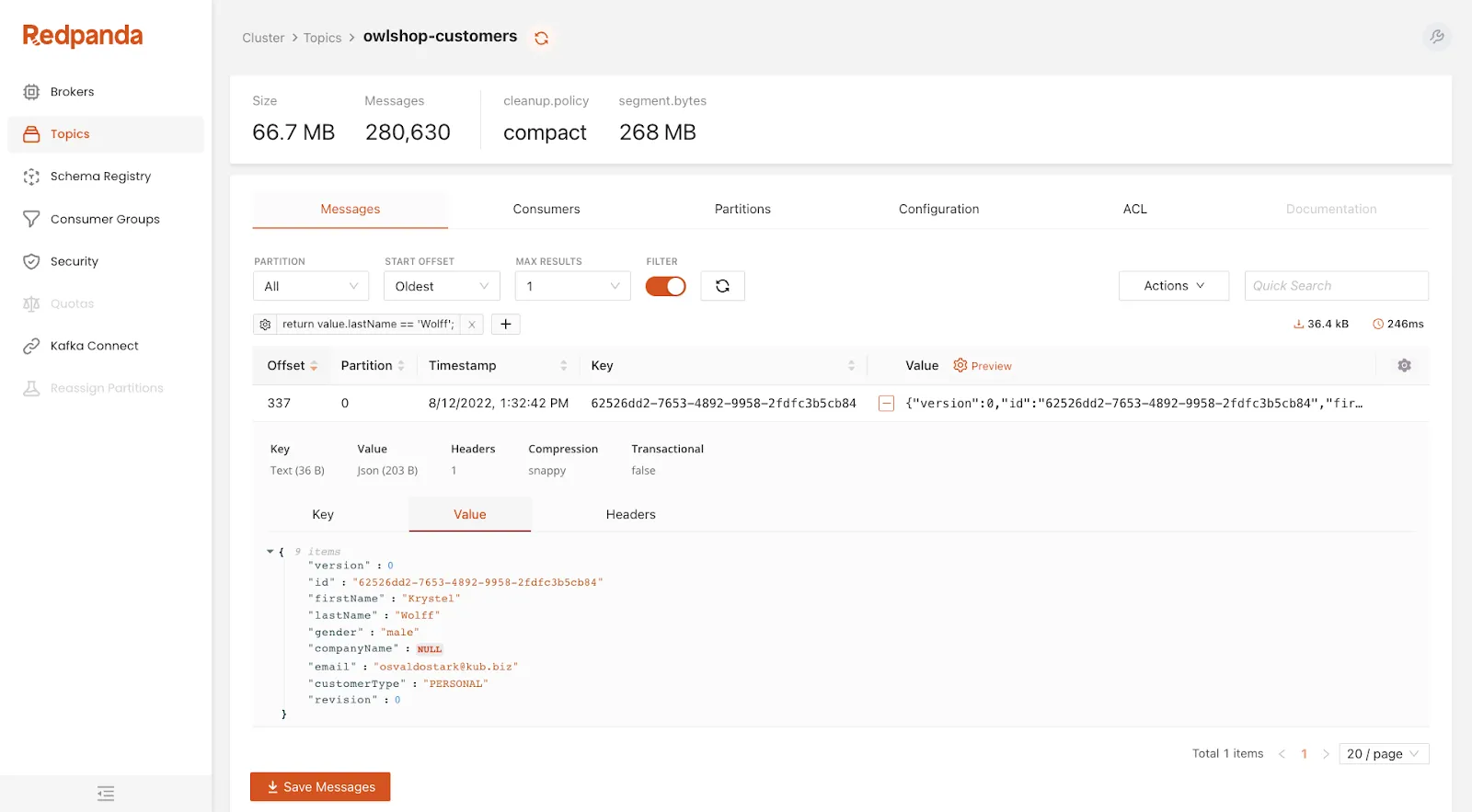
- Redpanda Console: Provides topic visibility, consumer group management, and real-time data exploration for development and debugging.
- Redpanda Connect: More than 300 connectors for systems including MongoDB, Snowflake, S3, MySQL, and PostgreSQL, alongside native compatibility with Kafka ecosystem tools.
- Marketplace availability: BYOC and Dedicated are available through the AWS and GCP marketplaces, with Azure currently offering Dedicated only.
Limitations (as reported by users on Gartner Peer Insights):
- Pricing model concerns: A reviewer evaluating the platform reported pricing several times higher than the competitors they were considering moving away from.
- Community and enterprise gap: Reviewers describe a wide difference in capability between the community and enterprise editions.
- Low-level tuning difficulty: Advanced tuning is reported as difficult, even though basic deployment and management are straightforward.
Managed Kafka Services from Cloud Platform Providers
5. Amazon Managed Streaming for Apache Kafka (Amazon MSK)
Best for: AWS-centric teams running Kafka beside other AWS services
Strengths: Express brokers, serverless option, native AWS integrations
Things to consider: Dedicated brokers cost a lot at low volume
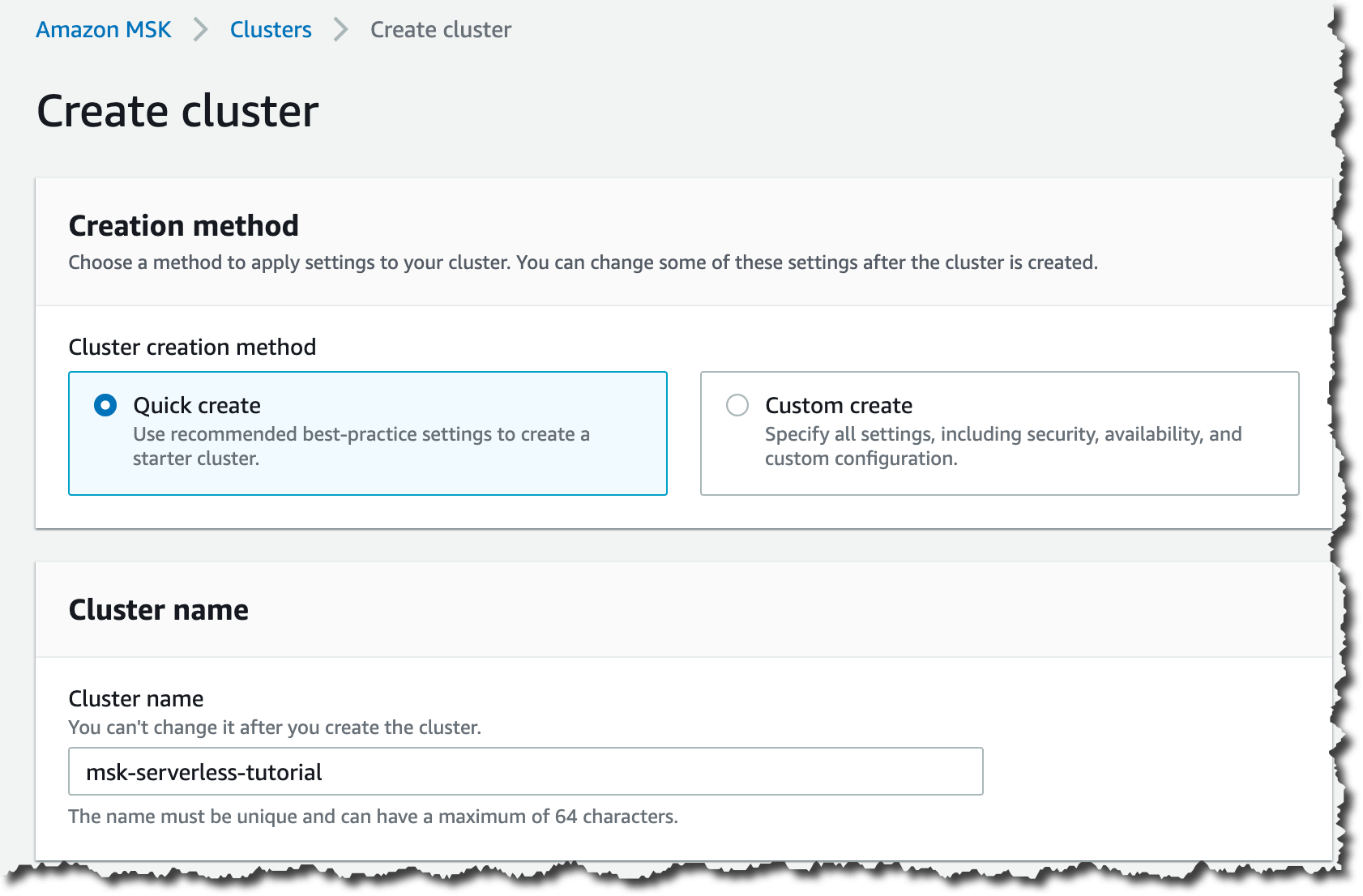
Amazon MSK manages Apache Kafka infrastructure and operations on AWS, covering provisioning, configuration, and maintenance of highly available clusters. It runs native Apache Kafka APIs and includes built-in integrations with other AWS services.
The service offers two broker types under MSK Provisioned. Express brokers deliver up to 3x more throughput per broker, scale up to 20x faster, recover 90% quicker, and support up to 5x more partitions per broker than standard brokers, which improves price-performance by up to 50% on partition-bound workloads. Standard brokers offer more configuration flexibility. MSK Serverless removes cluster capacity management entirely.
Pricing:
- MSK Serverless starts at about $0.75 per cluster-hour.
- Partition usage is about $0.0015 per partition-hour.
- Data in is about $0.10/GB and data out about $0.05/GB.
- Storage is about $0.10/GB-month.
- Provisioned standard brokers start around $0.20 per broker-hour, depending on instance type.
- Express brokers cost more per hour but can improve price-performance on high-throughput workloads.
- MSK Connect, Replicator, private connectivity, and data delivery are billed separately.
- Small workloads can become expensive on provisioned brokers, making Serverless the more cost-effective entry point.
Key features include:
- Managed cluster operations: Provisioning, configuration, and maintenance of multi-AZ Apache Kafka clusters are handled by the service, with automated detection, mitigation, and recovery of infrastructure issues.
- Express brokers: Purpose-built brokers with higher per-broker throughput, faster scaling, quicker recovery, and higher partition ceilings than standard brokers.
- MSK Serverless: Runs Kafka without managing cluster capacity, billing on cluster hours, partition hours, data in and out, and storage consumed.
- Native data delivery to S3: Express brokers continuously materialize Kafka topics as Apache Iceberg tables on S3 Tables with inline compaction and writer coordination, or deliver to general purpose S3 buckets, without separate connectors or workers.
- Managed Kafka Connect: MSK Connect runs connectors on managed workers sized in MSK Connect Units, each providing 1 vCPU and 4 GB of memory, alongside no-code integrations with other AWS services.
- MSK Replicator: Supports both cross-region and same-region replication, with all topics from a source cluster covered by a single replicator within service quotas.
- Private connectivity: AWS PrivateLink-powered multi-VPC connectivity lets Kafka clients in other VPCs or accounts reach a cluster privately.
- Migration tooling: Topic data and metadata can be migrated from on-premises Kafka, Kafka on AWS, other cloud providers, and Kafka-protocol-compatible services.
Limitations (as reported by users on G2):
- Cost on small workloads: Reviewers report that dedicated brokers become expensive for smaller workloads and early-stage projects compared with serverless messaging alternatives.
- Kafka expertise still required: Designing partitions, replication factors, and consumer groups for good performance is described as requiring real Kafka knowledge.
- Flexibility compared with self-managed Kafka: Several reviewers found the service less flexible than running Kafka themselves, and one reported having to migrate data manually to change cluster size.
- Additional metric charges: Monitoring metrics can carry extra charges on top of broker and storage costs.
- Service limits and regional availability: Reviewers cite broker, storage, and configuration limits that require a support request to raise, plus limited availability in some regions.
Source: Amazon
6. Google Cloud Managed Service for Apache Kafka

Best for: Google Cloud teams streaming into BigQuery and analytics systems
Strengths: Cluster-level sizing, automatic broker sizing, tiered storage
Things to consider: Three-zone clusters only; no zone or local storage choice
Google Cloud Managed Service for Apache Kafka runs open source Apache Kafka and Kafka Connect code, so existing Kafka applications work without code changes. Rather than sizing individual brokers, teams set total vCPU and RAM for the cluster and the service provisions, resizes, and rebalances brokers to match.
Clusters are provisioned across three zones and are highly available by default. The service integrates with Google Cloud IAM, Cloud Monitoring, Cloud Logging, customer-managed encryption keys, and VPC, and applies automatic version updates to keep clusters on a recent Kafka release.
Pricing:
- Kafka compute starts at about $0.09 per DCU-hour.
- Kafka Connect compute starts at about $0.12 per DCU-hour.
- Local storage is roughly $0.17/GiB-month.
- Long-term storage is roughly $0.10/GiB-month.
- Inter-zone transfer is about $0.01/GiB.
- One-year committed use discounts reduce compute costs by about 20%.
- Three-year commitments reduce compute costs by about 40%.
- New Google Cloud customers receive $300 in free credits.
- Costs scale closely with provisioned compute and throughput, so smaller workloads should be sized carefully.
Key features include:
- Cluster-level capacity sizing: Teams set total vCPU and RAM, and the service provisions new brokers and scales existing ones, vertically up to 15 vCPU per broker before adding brokers.
- Automatic broker sizing and rebalancing: Cluster creation, broker resizing, and partition rebalancing are handled by the service rather than configured manually.
- Open source compatibility and portability: The service runs upstream Apache Kafka and Kafka Connect, so applications migrate without code changes.
- Kafka Connect data integration: Connect clusters migrate and replicate Kafka clusters and write to BigQuery and Cloud Storage, currently in preview.
- Standard schema registry API: Implements the Confluent Schema Registry REST API, supporting Avro and Protobuf formats, in preview.
- Tiered storage: Data moves from local persistent disk to long-term storage, where a single replica of each topic is billed.
- Rack-aware three-zone deployment: All clusters are provisioned across three zones with a default replication factor of three and replicas placed in different zones.
- Built-in observability and security: Cloud Monitoring, Cloud Logging, IAM, customer-managed encryption keys, VPC integration, and automatic version updates come as standard.
Limitations (based on publicly available sources):
- Fixed three-zone topology: Every cluster must have equal resources in each of three zones, single-zone and two-zone clusters are not supported, and zones cannot be chosen at creation.
- Storage configuration: The volume of local storage on a cluster cannot be configured, and billing assumes 100 GB of local SSD per vCPU.
- Delayed configuration changes: Read-only broker configuration updates only take effect when brokers restart, which happens on Google’s maintenance schedule with no way to trigger a restart manually.
- Metrics and mode support: JMX APIs for metrics are not supported, and the service runs only in KRaft mode.
- Preview-stage integrations: Kafka Connect support and the schema registry API are both listed as preview features rather than generally available.
5. Azure Event Hubs for Apache Kafka

Best for: Azure teams ingesting events through a Kafka-compatible endpoint
Strengths: Throughput-unit pricing, Kafka endpoint, Capture to storage
Things to consider: Kafka excluded from Basic tier; short retention windows
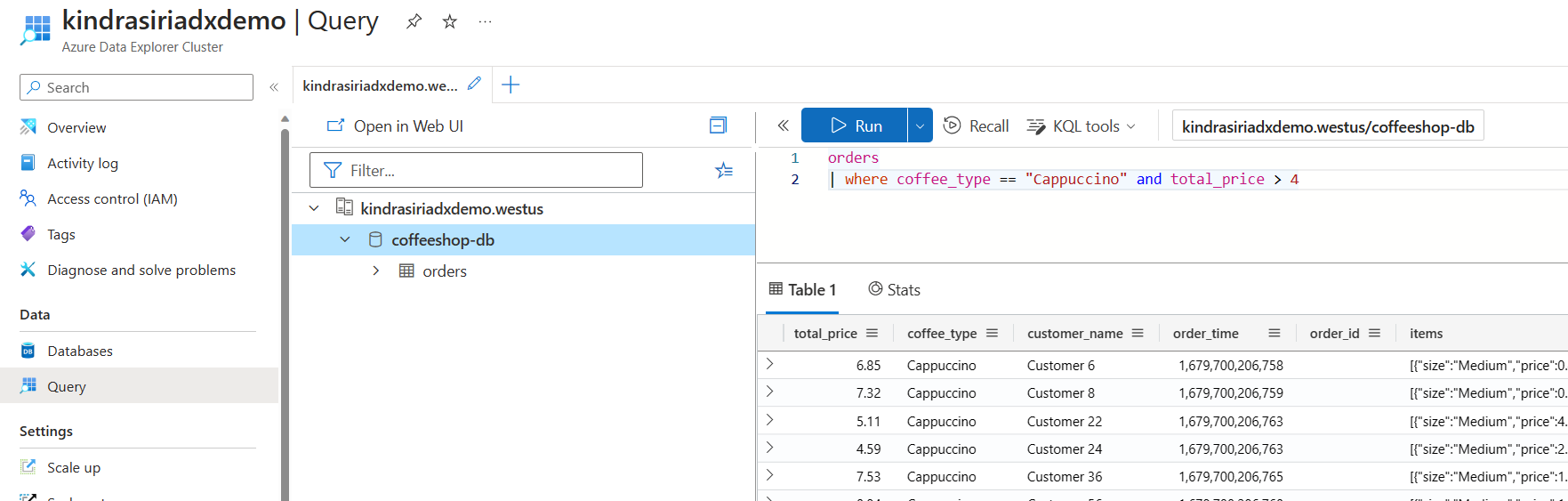
Azure Event Hubs is a managed real-time data ingestion service that streams millions of events per second from any source. It is not Apache Kafka itself, but Azure Event Hubs for Apache Kafka lets existing Kafka clients and applications connect without code changes, giving a managed Kafka-protocol experience without running clusters.
The service supports AMQP, HTTPS, and the Apache Kafka protocol, and connects natively to other Azure services including Blob Storage, Data Lake Storage, and Stream Analytics. Geo-disaster recovery and geo-replication keep ingestion running during regional problems, and the service holds CSA STAR, ISO, SOC, GxP, HIPAA, HITRUST, and PCI certifications.
Pricing:
- Basic starts at about $0.015 per throughput unit-hour, but does not include Kafka support.
- Standard starts at about $0.03 per throughput unit-hour and includes the Kafka endpoint.
- Ingress events are billed at about $0.028 per million events on Basic and Standard.
- Premium starts at about $1.233 per processing unit-hour.
- Dedicated starts at about $6.849 per capacity unit-hour.
- Capture, extended retention, and geo-replication can add extra charges.
- Standard is the practical entry tier for Kafka-compatible workloads.
- The throughput-unit model can be cost-effective when traffic patterns are predictable.
Key features include:
- Kafka protocol endpoint: Existing Kafka clients and applications talk to Event Hubs without code changes, removing the need to operate Kafka clusters.
- High-volume ingestion: Continuously ingests data from hundreds of thousands of sources with low latency and configurable time retention.
- Event Hubs Capture: Sends data to Blob Storage or Data Lake Storage for long-term retention or micro-batch processing, without affecting egress throughput.
- Concurrent real-time and micro-batch processing: The same stream supports both real-time consumption and micro-batching.
- Elastic throughput scaling: Throughput scales dynamically from megabytes to terabytes while keeping control over when and how much to scale.
- Geo-disaster recovery and geo-replication: Keeps data ingestion running during regional incidents, with geo-replication available on Premium and Dedicated tiers.
- Native Azure integrations: Connects directly to Stream Analytics for serverless streaming pipelines and to other Azure data services.
- Hybrid ingestion: Azure Stack Hub supports local ingestion and processing at scale for hybrid architectures.
- Schema Registry: Available from the Standard tier upwards for coordinating message formats.
Limitations (as reported by users on G2):
- Limited configuration surface: Reviewers describe internals as hidden, so flexible behavior requires writing custom functions rather than adjusting settings.
- Retention beyond short windows: Persisting events for longer than about a month is described as awkward to arrange.
- Cost relative to alternatives: One reviewer described the wider Azure product stack, Event Hubs included, as overpriced compared with competitors.
- Learning curve and documentation: Users without existing cloud platform experience found the service hard to pick up and asked for better documentation.
- Portal responsiveness: The interface is reported as occasionally glitchy or slow, and navigation is described as unintuitive by some reviewers.
- Azure dependency: Several reviewers noted the service makes far less sense for teams not already running on Azure.
Source: Microsoft
8. DigitalOcean Managed Kafka

Best for: Small teams wanting flat-rate managed Kafka with simple setup
Strengths: Flat monthly cluster price, schema registry, storage autoscaling
Things to consider: Fewer advanced features; pricing steps up sharply
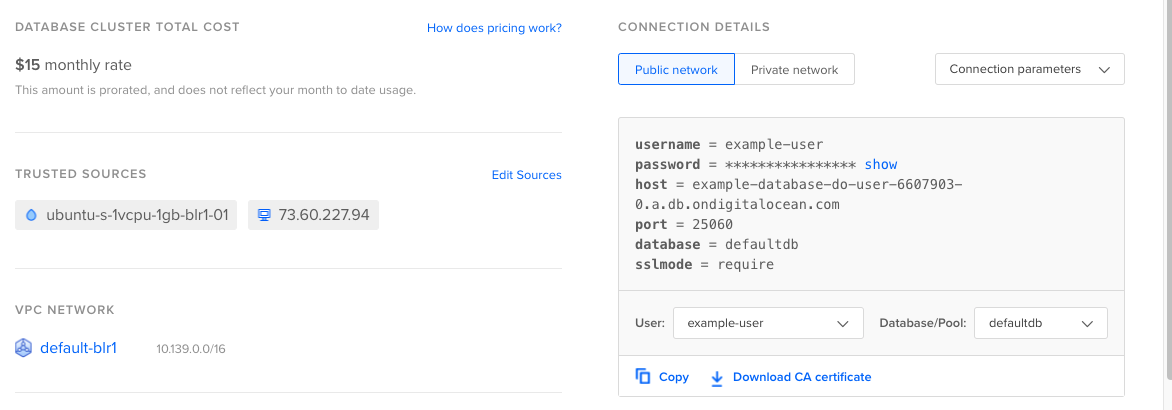
DigitalOcean Managed Databases for Apache Kafka handles provisioning, configuration, and running of Kafka clusters, leaving teams to build topics, producers, and consumers. Clusters launch from the UI, CLI, or API in minutes.
Capacity can be adjusted vertically and horizontally at any time by changing the configuration plan, broker count, or total disk storage, and storage autoscaling handles data growth. Clusters can be configured with 3, 6, 9, or 15 brokers depending on failover requirements, and clusters can be provisioned on fully dedicated virtual CPUs for consistent performance.
Pricing:
- Pricing is flat-rate and shown before cluster creation.
- A three-node shared-vCPU cluster starts at about $148.80/month.
- A three-node dedicated-vCPU cluster starts at about $599.25/month.
- Rates are consistent across DigitalOcean data centers.
- Billing uses monthly caps, which makes spend easier to predict.
- Storage and common managed features are included rather than itemized as separate add-ons.
- The model is well suited to startups that prefer predictable monthly costs over usage-based Kafka billing.
Key features include:
- Fast provisioning: Highly available clusters are created through the UI, CLI, or API, then topics, producers, and consumers are added.
- Vertical and horizontal scaling: The configuration plan, number of brokers, and total disk storage can all be adjusted at any time, with autoscaling available for storage.
- Configurable broker counts: Clusters run with 3, 6, 9, or 15 brokers, letting teams trade cost against failover headroom.
- Automatic broker replacement: If a broker fails, a healthy broker is swapped in while the rest of the cluster continues to push and pull messages without downtime.
- Kafka Schema Registry: Provides centralized schema management for event-driven applications, enforcing schemas on topics.
- Automatic updates: Clusters are updated automatically to stay stable and patched, with minimal disruption.
- Network isolation: Clusters run inside the account’s private network and are unreachable from the public internet unless the source is whitelisted, with data encrypted in transit and at rest.
- Dedicated vCPU option: Clusters can be provisioned on 100% dedicated virtual CPUs for stable performance.
- Metrics, insights, and alerting: Integrated monitoring with configurable alerts, plus log forwarding from the Kafka cluster to an external log management provider.
Limitations (as reported by users on G2): Note that G2 lists DigitalOcean as a platform rather than a separate Managed Kafka product, so the points below come from reviews of the wider platform and its managed database services.
- Managed database pricing steps: Reviewers describe the cost jump when adding storage or a standby node to managed databases as steep, and consider managed databases expensive for small projects.
- Fewer advanced services: Compared with larger cloud providers, reviewers report a narrower set of managed services, regions, and deep customization options.
- Networking and analytics depth: Granular networking controls and detailed application-level analytics are cited as limited or requiring extra setup.
- Support responsiveness: Response times are reported as slow during busy periods and on lower support tiers, with no direct phone contact available.
- Scaling ceiling: Several reviewers note the platform becomes less cost-effective and less feature-rich as infrastructure grows toward enterprise scale.
Conclusion
Managed Apache Kafka tools offer a smoother path to deploying and operating robust, scalable data streaming platforms. By offloading the complexities of cluster management, these services enable teams to improve reliability, ensure compliance, and scale efficiently. Whether supporting mission-critical applications or dynamic workloads, managed Kafka solutions provide the operational backbone needed for modern event-driven systems.